OAuth 2.1 Authorization Server
The Identity Service is an OAuth 2.1 authorization server. Any application that supports the OAuth authorization code flow with PKCE can sign a user in to an environment, with the identity providers of that environment, and get an access token for it. The user selects the environment while signing in. The token contains only the permissions that the user grants to the application, and only as long as the user still has them.
Typical applications are:
- The Mosaic CLI, which AI agents that run commands on your computer and use skills, such as Claude Code, Claude Desktop or Codex, use to work with an environment.
- Other command-line tools and native apps that act for a user.
- Integration tools such as Postman or n8n, which get access tokens for service accounts with the standard client credentials grant.
Applications that sign users in act in their name, with their permissions, instead of a shared secret with fixed permissions.
Every change such an application makes shows the user and the application, for example Thomas Anderson (via Mosaic CLI).
Endpoints
The issuer is:
https://id.service.eu.axinom.net
| Endpoint | Purpose |
|---|---|
GET /.well-known/oauth-authorization-server | Authorization server metadata (RFC 8414) |
GET /oauth/authorize | Starts a sign-in with the authorization code flow and PKCE |
POST /oauth/token | Issues and refreshes access tokens, and issues tokens for service accounts |
POST /oauth/revoke | Ends the session of a refresh token, e.g. when an application signs out |
GET /<tenant-id>/<environment-id>/.well-known/jwks.json | Public keys to validate the access tokens of an environment |
GET /.well-known/mosaic-services | The GraphQL and REST APIs of the managed services and the access token each accepts, used by the Mosaic CLI |
All paths are relative to the issuer. Most OAuth libraries and tools only need the issuer or the metadata URL; they discover the other endpoints from the metadata.
Each environment keeps its own OAuth clients, identity providers, users and signing keys.
Access tokens are signed with the keys of their environment, so the metadata has no jwks_uri; the keys of an environment are at its jwks.json path.
OAuth Clients
No application can connect to an environment until it is added as an OAuth client of that environment. Users with the right permissions manage the OAuth clients in the Management System; see Manage OAuth Clients.
Each OAuth client has one of two registration types:
| Registration type | Client ID | Redirect URIs | Typical applications |
|---|---|---|---|
| CIMD (Client ID Metadata Document) | The HTTPS URL of the metadata document that the application publishes, e.g. https://docs.axinom.com/mosaic-cli/client-metadata.json | Taken from the metadata document | The Mosaic CLI |
| Pre-Registered | Generated by the Identity Service | Entered when the client is added | Applications without a metadata document, e.g. an internal tool |
A Client ID Metadata Document is a JSON document in which an application describes itself: its name, its redirect URIs and how it authenticates. It lets an environment add an application by a single URL.
Rules for OAuth clients:
- Applications that sign users in are public clients: they prove themselves with PKCE, not with a secret.
A metadata document must allow
noneas its token endpoint authentication method. - Redirect URIs must be HTTPS URLs,
http://localhostorhttp://127.0.0.1URLs, or a private-use URI scheme of a native app in reverse domain name notation, e.g.com.example.app:/callback. Loopback redirect URIs match on any port.
Allow Any OAuth Client
An Environment Administrator can allow any application with a Client ID Metadata Document to connect, without adding it first. This is the Allow Any OAuth Client setting in the Admin Portal, in the configuration of the Identity Service of the environment.
With this setting, an application is added to the OAuth clients of the environment once a user grants it permissions, where it can be reviewed and disabled. Disabled clients stay blocked. Users still have to sign in and grant the application its permissions.
Signing In and Granting Permissions
An application signs a user in with the authorization code flow and PKCE. The first page asks for the environment.
What the user sees:
Environment, sign-in and permission pages when signing in with the Mosaic CLI
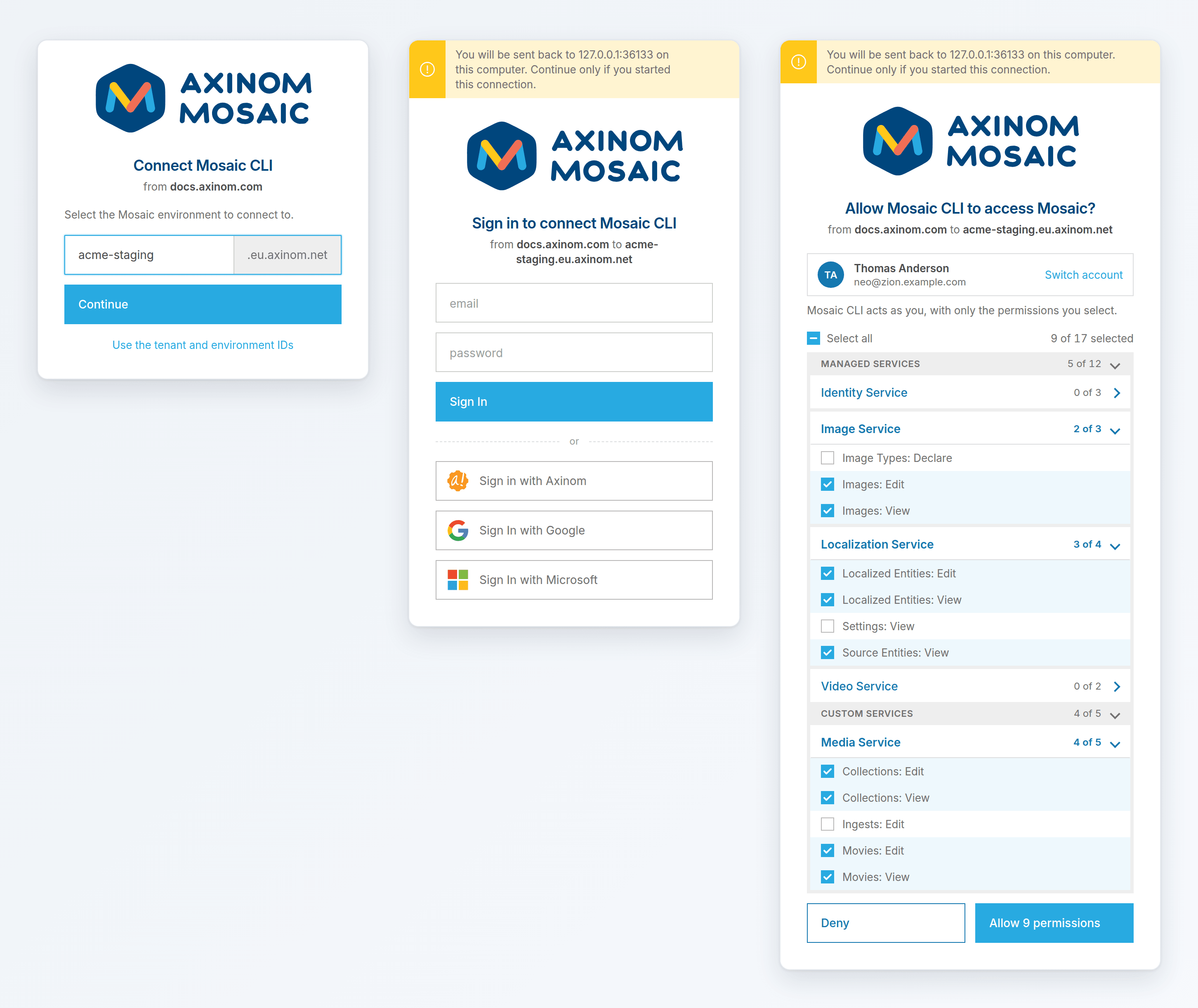
- Environment page: the user enters the subdomain of the environment's Management System, e.g.
acmeforacme.eu.axinom.net, or selects an environment used before. The tenant and environment ID work as well. The environment's IP whitelist applies as for its Management System: from other addresses, the domain is not found. Any input that doesn't lead to an environment shows the same "not found" message. - Sign-in page: the same identity providers as the sign-in of the Management System, with their configured names and images. A user who is already signed in to the Management System in the same browser skips this page.
- Permission page: which application asks for access, for which environment, and the permissions that the user has, grouped by managed and custom services. The user selects the permissions to grant; Select all selects all of them. When the application returns to an address on the same computer, the page shows a warning, so the user can check that they started the sign-in. On a later sign-in of the same application, the previous selection is preselected.
- Deny returns to the application without access.
A user never sees or grants permissions they don't have. Each sign-in creates a separate session with its own granted permissions. To work with several environments, or with different permissions for different tasks, connect the same application more than once.
Access Tokens
Access tokens of OAuth sessions have the same format as Management System tokens and work with every Mosaic service. These claims differ:
| Claim | Management System | OAuth session |
|---|---|---|
aud | * | The requested resource, or * if none was requested |
name | Thomas Anderson | Thomas Anderson (via Mosaic CLI) |
permissions | The permissions of the user's roles | The granted permissions that the user still has |
exp | The environment's access token lifetime | The environment's access token lifetime, at most 10 minutes |
Sessions
The application refreshes its access token with its refresh token before or when it expires.
- Rotation: every refresh returns a new refresh token and invalidates the previous one.
- Replay protection: if a previous refresh token is used again, the session is revoked. A stolen refresh token then stops working for everyone.
- Lifetime: a session ends when it isn't refreshed within the environment's cookie lifetime, when the identity provider ends the sign-in, and 90 days after the sign-in at the latest. After that, the user signs in again.
- Permission changes: a permission removed from the user's roles disappears from the next access token. A permission the user gains is only added after the user grants it in a new sign-in.
| Action | Effect |
|---|---|
| Disable the OAuth client | Its sessions can no longer refresh |
| Delete the OAuth client | Its sessions are deleted |
Delete a session (deleteUserSession) | The application fails at its next refresh |
Revoke all sessions of a user (revokeRefreshToken) | All applications of the user fail at their next refresh |
Revoke a refresh token (/oauth/revoke) | The session ends, e.g. with mosaic env logout |
| Remove a permission from a user role | Gone from the next access token |
These take effect at the next refresh. Access tokens already issued stay valid until they expire, within 10 minutes. When a refresh fails, the application asks the user to connect again.
The access management API of the Identity Service lists the active sessions of an environment with userSessions (permission USER_SESSIONS_VIEW).
Service Accounts
Service accounts get access tokens from the token endpoint with the standard OAuth 2.0 client credentials grant. Any OAuth-compliant library or tool can request them:
curl -X POST https://id.service.eu.axinom.net/oauth/token \
  -u "<client-id>:<client-secret>" \
  -d grant_type=client_credentials
The client ID determines the environment of the service account.
The client ID and secret can also be sent in the request body (client_secret_post).
With resource=<URL>, the access token is issued for that resource.
The access token is the same as from the authenticateServiceAccount mutation.
See Authenticate a Service Account.
Supported Standards
| Standard | Support |
|---|---|
| OAuth 2.1 | Authorization code flow with PKCE, exact redirect URI matching, refresh token rotation; no implicit or password grant |
| RFC 6749, OAuth 2.0 | Client credentials grant for service accounts. Scopes are not used: users grant permissions on the permission page |
| RFC 7636, PKCE | Required, S256 only |
| RFC 8414, Authorization Server Metadata | Supported, without jwks_uri: each environment publishes its own keys |
| RFC 8707, Resource Indicators | One resource per token, which becomes the aud claim |
| RFC 9207, Issuer Identification | iss in every authorization response |
| RFC 8252, OAuth for Native Apps | Loopback redirects on any port and private-use URI schemes |
| RFC 7009, Token Revocation | Refresh tokens; access tokens expire within 10 minutes |
| RFC 9700, OAuth Security Best Current Practice | PKCE, exact redirects, refresh token rotation with replay protection, CSRF protection, no framing of the pages |
| OAuth Client ID Metadata Document | Supported |
| RFC 7591, Dynamic Client Registration | Not supported, in favor of Client ID Metadata Documents |
| OpenID Connect (as a provider) | Not supported: no ID tokens or userinfo for clients |